
Advanced Flow

Introduction

The Advanced Flow gives you full control over how payment data is collected and processed. It separates the secure collection of sensitive card information (handled by the SecureFields SDK) from the actual payment creation (handled by the Payment API).

This flow is recommended if you want to:

  • Keep a low-level integration with maximum flexibility.
  • Control when and how payments are created.
  • Handle business rules before sending a payment request.
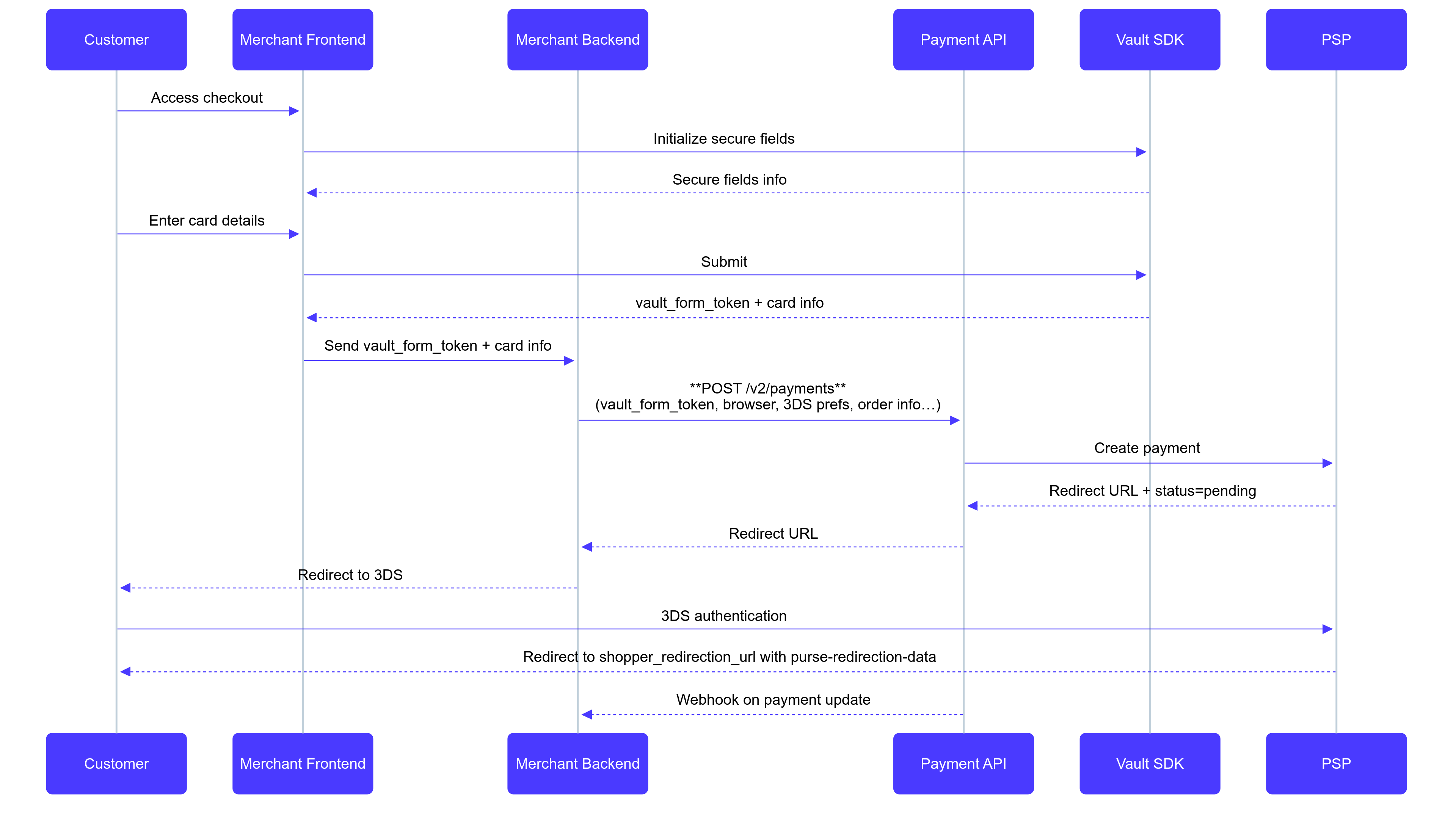
Below is the nominal sequence for a successful payment using the Advanced Flow:

Advanced Flow sequence

Flow Description

  1. Checkout initialization — The customer opens checkout; the Merchant Frontend initializes the SecureFields SDK and receives secure-fields configuration.
  2. Card data collection — The customer enters card details in secure fields. On submit, the SecureFields SDK returns a vault_form_token (no PAN/CVV touch your systems) which is sent to the Merchant Backend.
  3. Payment creation — The Merchant Backend calls the Payment API with the token, order data, 3DS preferences, and shopper redirection URL. The API forwards to the PSP, creating a pending payment and returning a 3DS redirect URL.
  4. 3DS authentication — The customer is redirected to the PSP’s 3DS page. After successful authentication, the PSP redirects back to your shopper_redirection_url with context (purse-redirection-data).
  5. Final update — The Payment API sends the final payment status to the Merchant Backend via webhook.

Before you start

  • Ask your Purse Integration Team for a Vault Tenant ID and your Payment API Key.

Collect card details

In this section, we will show you how to collect card details using the SecureFields SDK.

1. Install the SDK

<!-- Sandbox -->
<script src="https://cdn.purse-sandbox.com/secure-fields/latest/purse.js"></script>

<!-- Production -->
<script src="https://cdn.purse-secure.com/secure-fields/stable/purse.js"></script>

The CDN script exports a global PurseSecureFields object.

You can get the ESM version from the CDN. Just replace purse.js with purse.esm.js.

2. Initialize SecureFields

import { loadSecureFields } from '@purse-eu/web-sdk';

async function init() {
const sf = await loadSecureFields('sandbox');

const secureForm = await sf.initSecureFields({
tenantId: '[your vault tenant_id]',
apiKey: '[your purse api_key (optional)]',
config: {
brands: ['VISA', 'MASTERCARD', 'CARTE_BANCAIRE', 'AMERICAN_EXPRESS'],
brandSelector: true,
fields: {
cardNumber: {
target: 'pan-placeholder',
placeholder: 'ex: 1234 5678 9012 3456',
ariaLabel: 'Numéro de carte',
iframeTitle: 'Numéro de carte'
},
cvv: {
target: 'cvv-placeholder',
placeholder: 'ex: 123',
ariaLabel: 'CVV',
iframeTitle: 'CVV',
},
expDate: {
target: 'exp-date',
placeholder: 'MM/YY',
ariaLabel: 'Expiry date',
iframeTitle: 'Expiry date',
},
holderName: {
target: 'holder',
placeholder: 'John Doe',
ariaLabel: 'Cardholder name',
iframeTitle: 'Cardholder name',
},
},
styles: {
color: "#181818"
}
}
}
);
}

init();

3. Render the fields

await secureForm.render();

4. Optionally update configuration

secureForm.setConfig({
fields: {
cardNumber: {
placeholder: 'ex :new placeholder',
},
},
styles: {
input: {
color: 'blue',
},
},
});

5. Listen for events

secureForm.on('ready', () => {
console.log('Secure fields are ready');
});

secureForm.on('change', (event) => {
console.log('Field changed', event);
});

6. Submit and receive vault_form_token

try {
const result = await secureForm.submit({
saveToken: false
});
console.log('vault_form_token received:', result.vault_form_token);
} catch (err) {
console.error('Submit failed', err.code, err.reason);
}

Create Payment

After successfully receiving the vault_form_token, you must pass this token to create a payment along with other required customer and order data when calling the payment creation endpoint.

To create a payment, call the /create_payment endpoint:

await fetch('https://api.purse-sandbox.com/payment/v2/payments', {
method: 'POST',
headers: {
'Content-Type': 'application/json',
'x-api-key': 'xxx'
},
body: JSON.stringify({
"entity_id": "your entity id",
"amount": 100,
"currency": "EUR",
"order": { ... }, // order data
"split": [
{
"vault_form_token": "123",
"three_ds_authentication_options": {
"challenge_indicator": "NO_CHALLENGE_REQUESTED"
}
}
],
"browser": { ... } // browser data
})
});

For 3DS payments, see 3DS authentication.

Complete Integration Example

This example shows a complete implementation flow including initialization, rendering, event handling, form submission, payment processing, and error handling.

Loading demo…

Next Steps